
Panic Button for Elderly People: 5 Essential Checks
A panic button for elderly people lets the wearer request help without reaching a phone. Pressing a pendant or wrist button sends an alert to a compatible home base, which connects to the monitoring service. Choosing the right system means checking where it works, how it is worn and who will respond.
Can a home panic alarm work without a landline?
Yes. A mobile-network home alarm with a SIM card, often called a GSM alarm, uses mobile coverage to send alerts. Other systems may use broadband or a suitable telephone connection. Ask which connection your chosen model needs and test it at the address where it will be used.
A home system has two main parts:
- A compatible pendant or wrist button worn by the person using the alarm.
- A powered base unit with a speaker and microphone, positioned according to its setup instructions.
The home button works within range of the base. A SIM card in a home base does not make the pendant a portable GPS alarm or send the wearer’s location. If support is needed away from home, compare a portable GPS option.
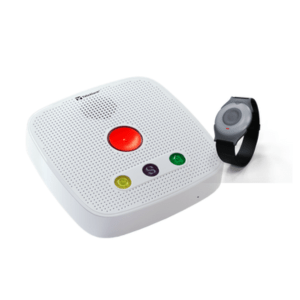
How Panic Alarms for Elderly People Operate
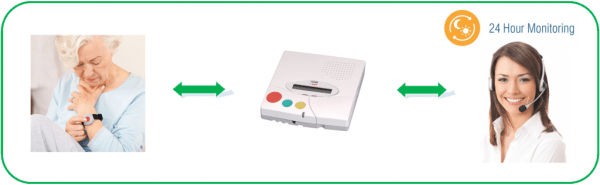
- Press the Button: When you need assistance, press the button on your panic alarm. This sends a signal to the two-way communication hub.
- Call to Monitoring Center: The hub then places a call to a 24/7 monitoring centre.
- Response and Assistance: Trained operators will communicate with you through the hub. If help is needed or if they do not get a response, they will generally then try to reach you on your mobile or home phone. If there’s still no response, they will contact one of your nominated contacts to check on you.
5 essential checks before choosing a panic button
Before ordering a panic button for elderly people, talk through these five checks with the person who will wear it.
- Home and garden range. Test the button in the rooms and outside areas where it will be used. An advertised line-of-sight range is measured in open conditions. Walls, floors and the position of the base can reduce coverage. Read our pendant alarm range guide.
- Water-use instructions. Follow the instructions for the exact button or watch. Do not assume that a water-resistant device is suitable for every type of bathing. Check our guide to personal alarms in the shower.
- Batteries and power. Ask how the button battery is checked and replaced, what replacements cost, and how long the base battery is designed to provide backup. A rechargeable device also needs a charging routine.
- Monitoring and response. Confirm who receives the alert, how the operator speaks to the wearer, and what happens if there is no reply. Agree emergency contacts and access arrangements before use.
- Compatibility and programming. Contact TASK Connect before buying extra pendants, a compatible Vibby or other sensors. We can check the home system and arrange programming before dispatch. Accessories are not interchangeable across all alarms.
Why Panic Alarms Are Beneficial
- A clear way to ask for help. A wearable button can be easier to reach than a telephone. Check that the wearer can find and press it comfortably, including when seated or in bed.
- Support with setup. Follow the instructions for your chosen system and complete a test call. TASK Connect GSM home alarms use an electrical socket and mobile coverage, so a working signal and correct placement matter.
- Costs you can plan for. Ask about setup, monitoring, replacement batteries and extra accessories. Compare what is included rather than the headline price alone.
Make the alarm part of a daily routine
A panic button for elderly people is most useful when it is worn, within range and ready to use. Decide when it will be put on each day and where any rechargeable device will be charged. Keep the base plugged in as instructed.
Arrange a practice call with the monitoring service. Let the wearer hear how an operator answers and explain what to do after an accidental press. Follow the provider’s testing schedule, and test again after moving the base or changing the phone or broadband service.
Keep nominated contacts and home access details up to date. An alarm supports a plan for getting help, but does not replace agreed care visits or guarantee that every incident will be detected.
Additional pendants and telecare sensors
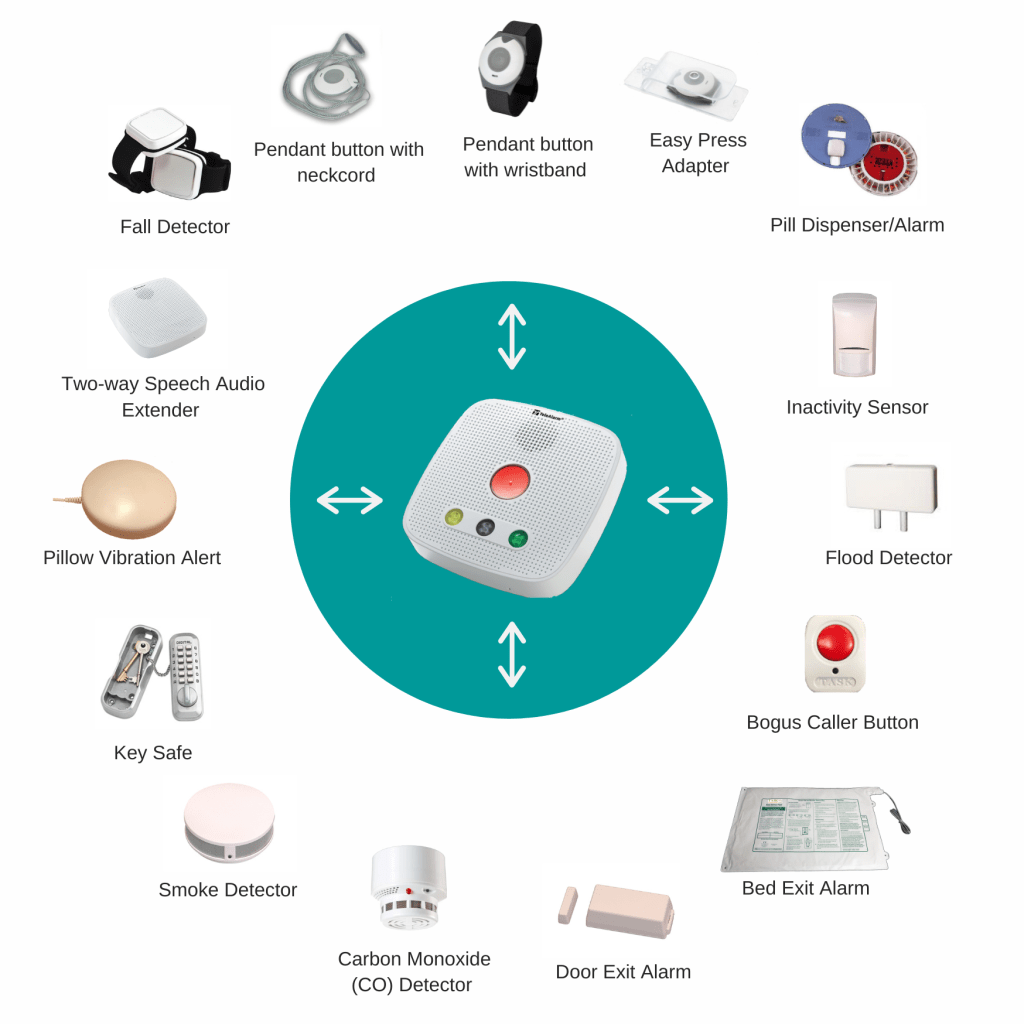
Compatible home systems can support another pendant for someone in the same household, a compatible Vibby fall detector and other sensors. Contact TASK Connect before purchasing extras so compatibility and programming can be checked before dispatch.
The available options depend on the base unit and service. Ask which alerts can be monitored and how each accessory should be tested. Fall detection has limits and cannot identify every fall, so the wearer should press the help button when able to do so.
Choosing the right support
Choose a panic button for elderly people around the wearer’s routine, home and support network. Involve them in the decision and check that the button feels comfortable. Ask TASK Connect about a suitable system before ordering.
Explore compatible accessories and sensors, or read the independent NHS guide to personal alarms, telecare and key safes for a broader explanation of the options.